
Help Center - Setup Guides and Troubleshooting
Installation
To confirm whether your Mac uses an Intel or Apple Silicon processor:
- Click the Apple icon in the top left corner of the screen
- Select "About This Mac"
- In the pop-up window, check the "Chip or Processor" information. If it starts with Intel, it's an Intel processor; otherwise, it's an Apple Silicon processor
- 1.
After downloading the macOS installer, open the .dmg file and drag VPN into Applications.


- 2.
Open Launchpad or Spotlight, then search for and open Terminal.


- 3.
Paste the command below into Terminal and press Enter. Enter your Mac login password when prompted; characters will not appear while typing. Press Enter again when finished.
sudo xattr -rd com.apple.quarantine /Applications/DriftVPN.app


- 4.
After the command finishes, search for VPN or open it from Applications.


- 5.
If macOS still blocks the app, go to System Settings → Privacy & Security and click Open Anyway in the Security section. If it says the app is damaged, download the latest installer again and repeat the command above.

If you cannot open VPN on macOS, go to System Settings → Privacy & Security, scroll to the Security section, and click Open Anyway.
To confirm whether your Windows computer uses x64, ARM64, or x86 (32-bit) processor:
- Open the System Information tool. Press Win + R, enter msinfo32, then press Enter
- Go to System Summary → System Type, you will see the system architecture information
Error prompt: Proxy executable file does not exist. Or prompt: The file contains a virus or potential unwanted software. Solution:
Method One:
- Open 'Settings' → 'Privacy & Security' → 'Windows Security Center' → 'Virus & Threat Protection'
- Click 'Manage Settings'
- At the bottom, add or remove exclusions, and add the Drift installation directory to the exclusions
Method Two:
- Open 'Settings' → 'Privacy & Security' → 'Windows Security Center' → 'Virus & Threat Protection'
- Click 'Manage Settings'
- Turn off 'Real-time Protection'
If the app cannot connect after launching on Windows, Windows Defender Firewall is usually blocking it. Solutions:
Method One: Add exception via Control Panel
- Press Win + S and search: Control Panel
- Go to: System and Security → Windows Defender Firewall
- On the left, click: Allow an app or feature through Windows Defender Firewall
- In the top right, click: Change settings
- Click: Allow another app
- Click: Browse and select your .exe file (default path: C:\Users\[user]\AppData\Local\VPN\QingZhou.exe)
- After adding, check: Private and Public (if external network access is needed)
- Click: OK
Method Two: Create rules in Windows Defender Firewall with Advanced Security
- Press Win + S, search 'Windows Defender Firewall with Advanced Security', and open it
- Click 'Inbound Rules' on the left → click 'New Rule' on the right
- Select: Program → Next
- Select 'This program path', browse to your .exe file → Next
- Select: Allow the connection → Next
- Check: Domain, Private, Public (usually all) → Next
- Enter a name (e.g., DriftVpn Inbound) → Finish
- Repeat the steps for 'Outbound Rules' (select 'Outbound Rules' on the left; the flow is the same as inbound)
You can download and install VPN for Android as follows:
- Open the official download page and choose Android.
- Download the Android installation package to your phone or tablet.
- Open the downloaded APK file from your browser downloads or file manager.
- If Android asks for permission to install unknown apps, allow it for the current browser or file manager, then continue the installation.
Some browsers or systems may save the APK file with a .zip extension. Handle it as follows:
- Do not unzip the file.
- Open the file manager and rename the downloaded file, changing the suffix from .zip to .apk.
- Tap the renamed .apk file to install it.
- If you cannot rename it, download it again or use another browser to download the APK.
Due to policy reasons, VPN is not available in the China App Store. You can download it by:
- You need a non-China Apple ID (e.g., US, Japan, Hong Kong, etc.)
- Switch to the non-China account in the App Store
- Search for 'VPN' to find and download it
- If you don't have an overseas Apple ID, you can search online for tutorials on how to register a free overseas Apple ID
Account
If you forgot your login password, you can reset it by following these steps:
- Go to the login page and click 'Forgot Password?'
- Enter your registered email address
- Check your email for a 6-digit verification code (valid for 5 minutes)
- Enter the verification code and your new password to complete the reset
Payment issues
The following payment methods are currently supported:
- Visa/Mastercard
If you need to cancel your subscription, first confirm which platform you used to subscribe. The cancellation steps differ by platform, and uninstalling the app does not automatically cancel your subscription.
Website Subscription
Steps:
- Go to the official website and log in from the top-right corner.
- After logging in, click "My Account – Plan & Billing" in the top-right corner.
- Click the Manage button next to your plan details.
- Cancel your subscription on the Stripe page.
iOS
If you subscribed via App Store on iPhone or iPad, cancel through Apple:
- Open Settings on your iPhone or iPad.
- Tap your Apple account name at the top.
- Tap Subscriptions.
- Select the VPN subscription.
- Tap Cancel Subscription.
If you are using an iOS device but subscribed via the website, follow the "Website Subscription" steps above.
Android
Non-Google Play Android subscriptions are processed via Stripe. See "Website Subscription" above to cancel.
Android – Google Play
If you subscribed via Google Play, cancel through Google Play:
- Open Google Play.
- Tap your profile icon in the top-right.
- Go to Payments & subscriptions.
- Tap Subscriptions.
- Select the VPN subscription.
- Tap Cancel subscription and follow the prompts.
Mac
Non-Mac App Store subscriptions are processed via Stripe. See "Website Subscription" above to cancel.
Mac – App Store
If you subscribed via Mac App Store, cancel through Apple:
- Open the App Store on your Mac.
- Click your account name.
- Click Account Settings.
- Find Subscriptions and click Manage.
- Select the VPN subscription.
- Click Cancel Subscription.
Windows
See "Website Subscription" above to cancel.
Usage
You can start your VPN trial with these steps:
- Register an account on the official website or in any client
- Sign in to your account in any client
- Tap the switch button on the home page to start using the service
If you have an activation code, you can redeem it after logging in:
- Log in to your account on the website or in the client.
- Click My Account in the top-right corner, then choose Redeem activation code from the dropdown menu.
- Enter the activation code and confirm the redemption.
- After redemption succeeds, the corresponding package or benefit will be added to your account automatically.
- If no success message appears, the activation code has already been used.
- After activation, restart the app for the package or benefit to take effect.
VPN currently supports the following platforms:
- Android (phones and tablets)
- iOS (iPhone and iPad, requires a non-China App Store)
- macOS (supports both Intel and Apple Silicon chips)
- Windows (supports x64 architecture)
A single account can keep up to 3 devices online at the same time. You can install the client and sign in on more devices; only the number of devices connected at the same time is limited. If the limit is exceeded, the earliest connected device will be automatically disconnected. The client currently does not support disconnecting other devices or logging them out with one click. To free an online slot, manually disconnect or log out on that device.
They control which traffic goes through VPN:
- Global Proxy sends most network traffic through VPN. Use it when you want all apps and websites to use the proxy connection.
- Smart Routing only proxies traffic that needs acceleration or access optimization. Local and directly reachable traffic stays on the original network, which is usually better for daily use.
- The built-in VPN rules cover most needs, and you can also add your own proxy rules.
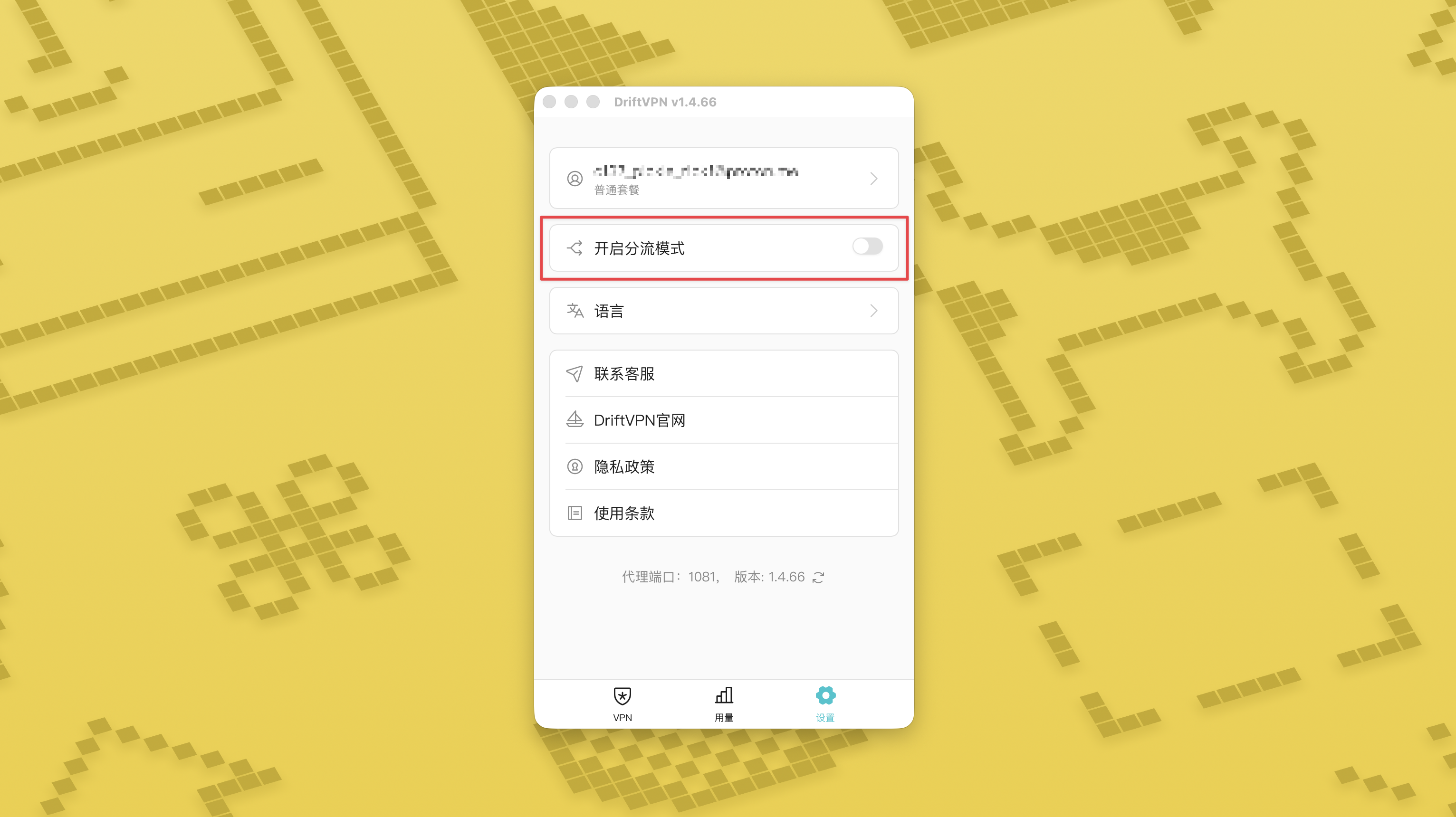
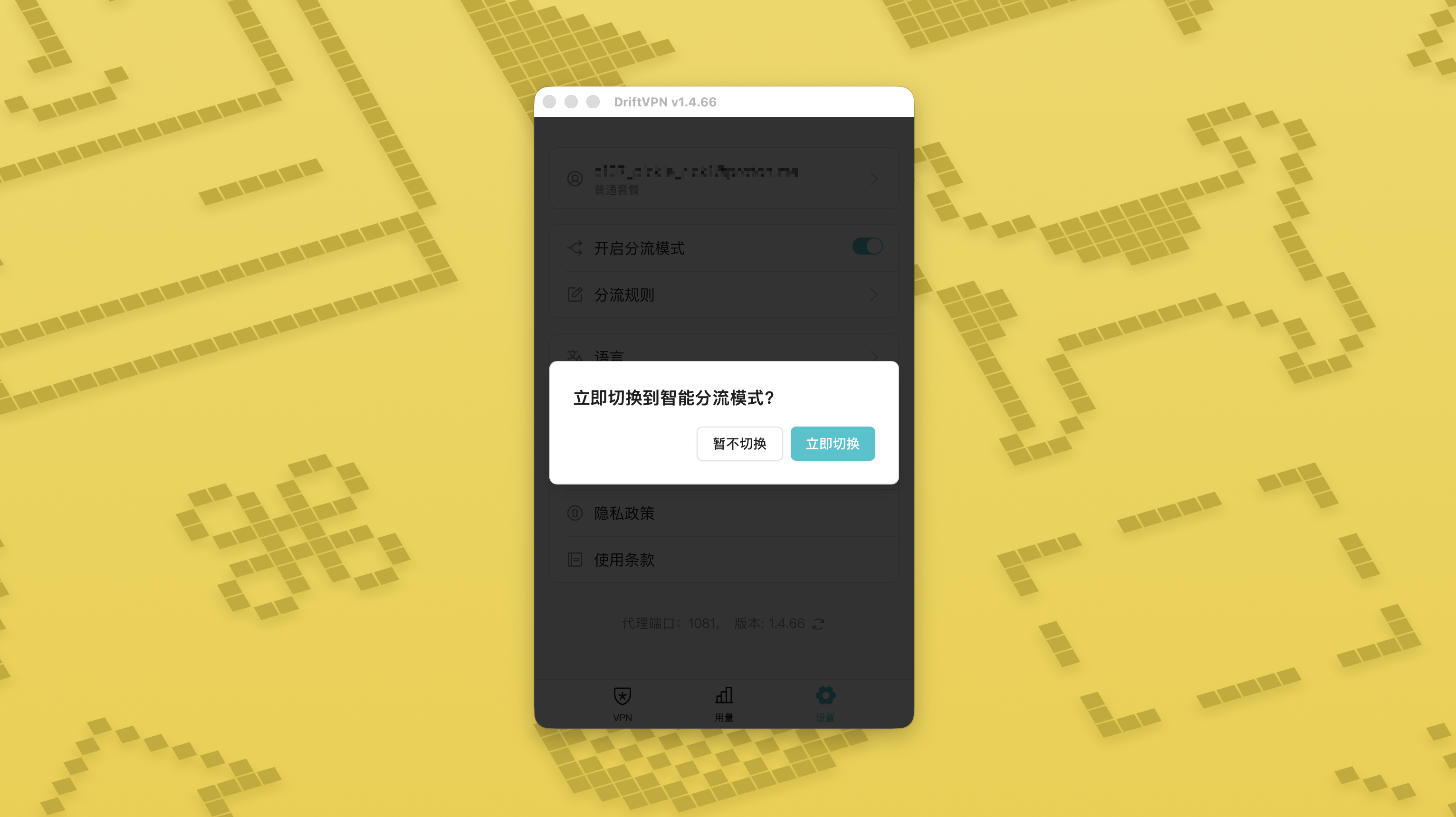
- 1.
On the Settings page, turn on Smart Routing mode and tap Switch now to enable it.
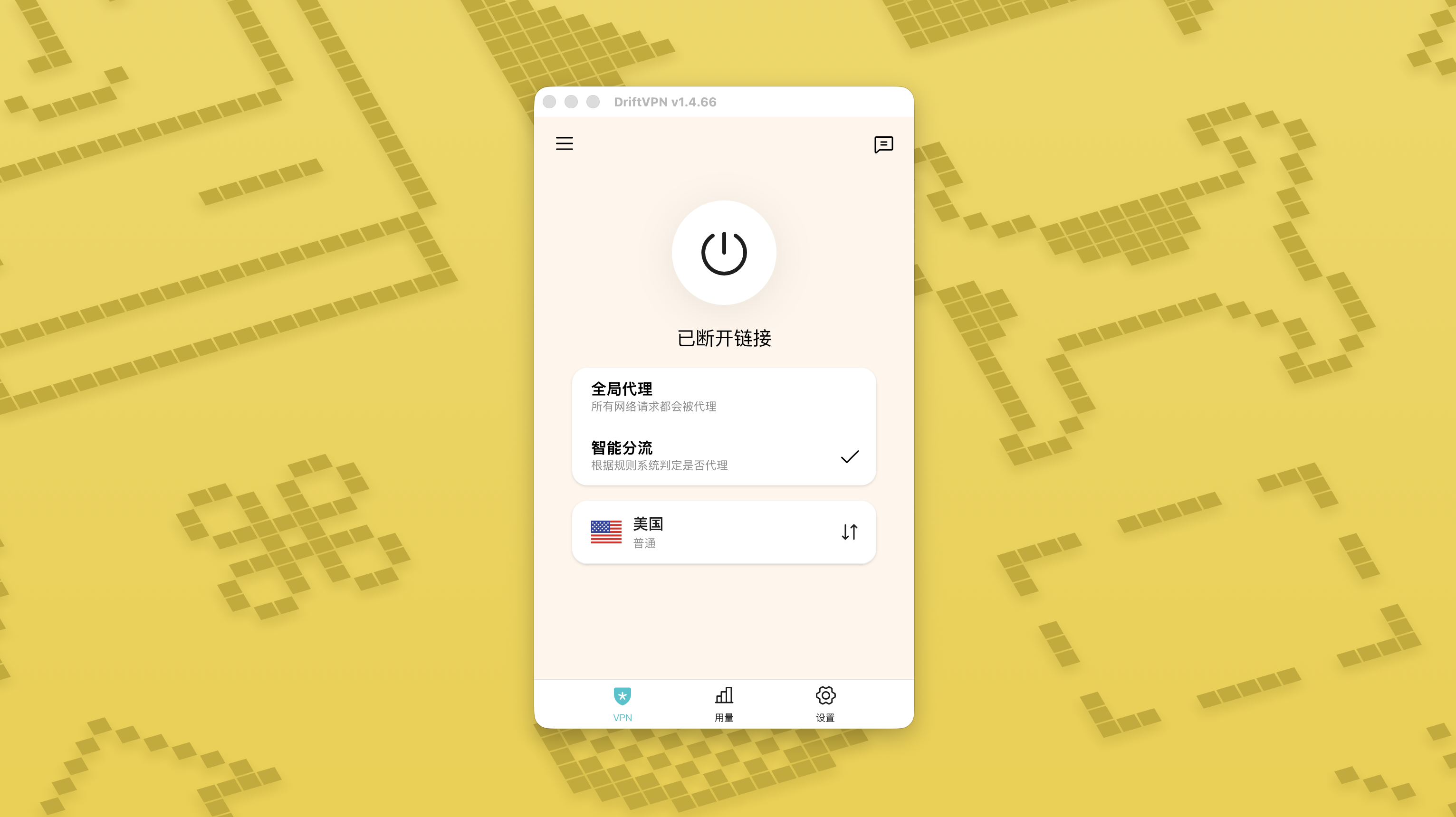
- 2.
After it is enabled, you can switch between Global Proxy and Smart Routing on the home page.
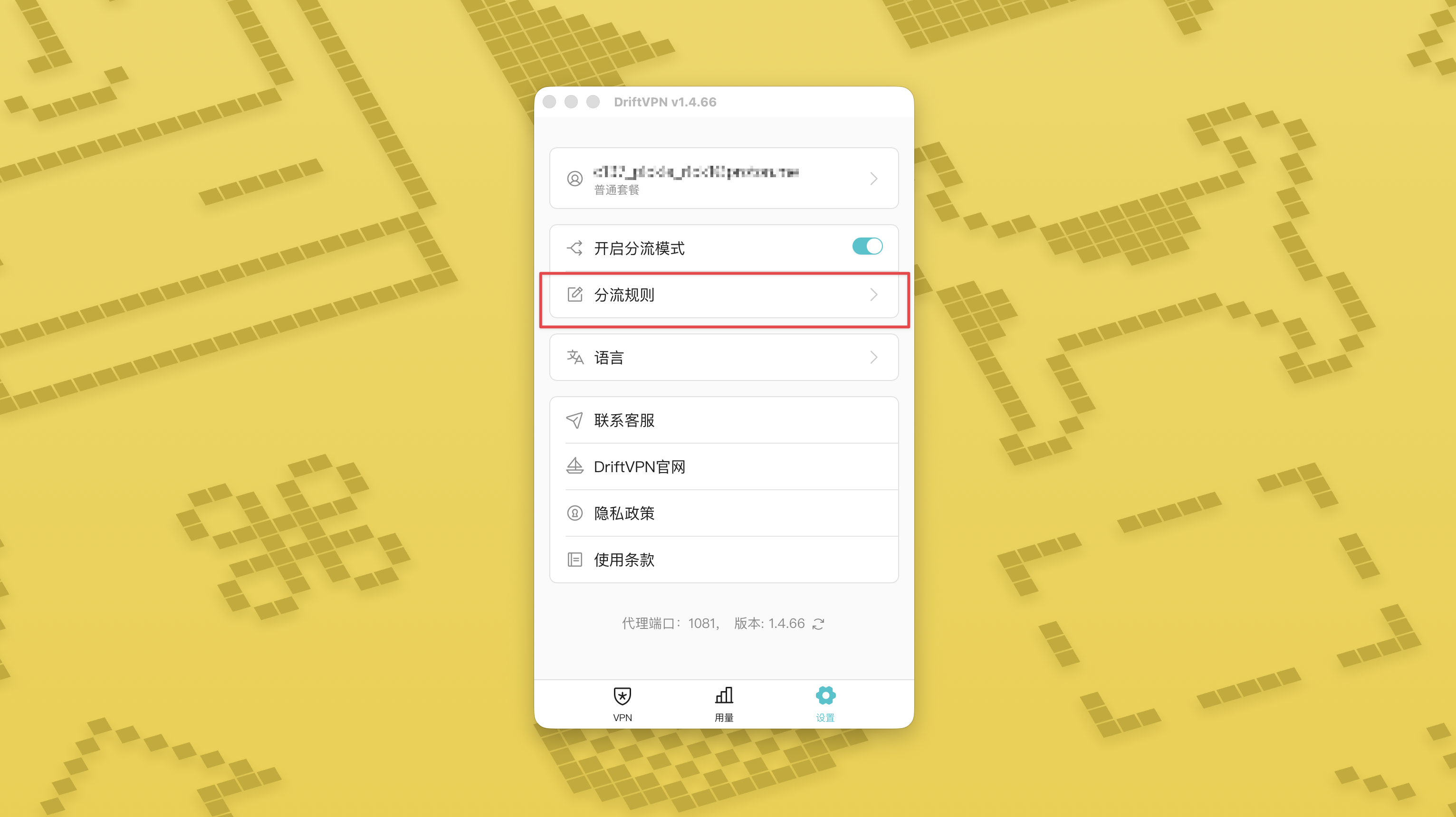
- 3.
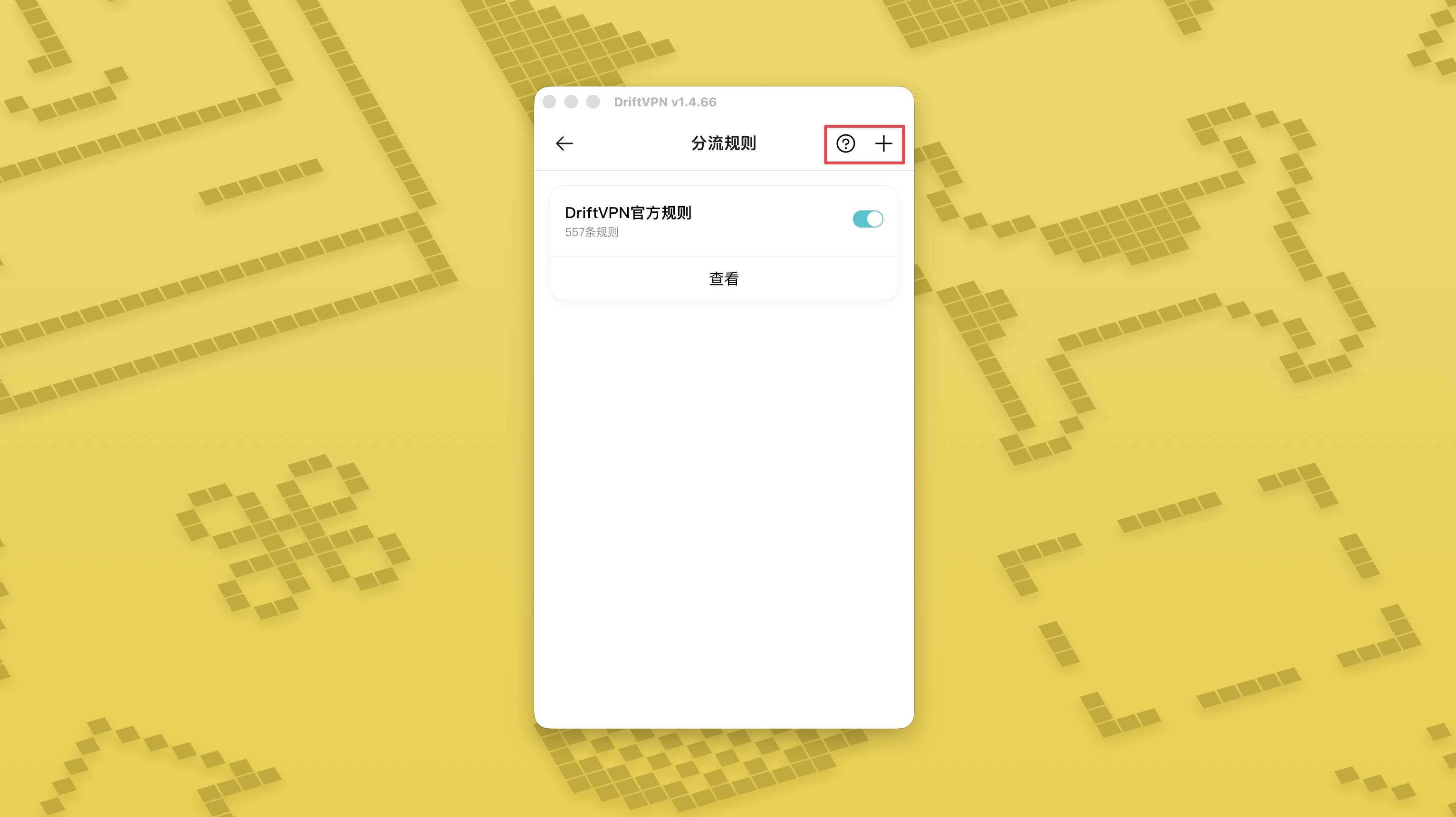
After Smart Routing mode is turned on, a Routing Rules page will appear in Settings.
- 4.
On the Routing Rules page, tap the + button in the top-right corner to add a rule, or tap the ? button to learn how to write rules. Each rule group can be enabled or disabled with its switch.
If you are already using a proxy tool like Clash, you can use DriftVPN as a front-end proxy and then connect to your residential IP proxy as the final exit. This is suited for advanced users who need to "first establish a connection through DriftVPN, then access the target website via a residential IP".
The default local proxy port for DriftVPN is . If that port is already in use by another program, the client will automatically try the next port, such as 、. When configuring, please use the local proxy port currently shown in the client (check the port number at the bottom of the VPN settings page after a successful connection).
Using a Clash / Mihomo client that supports proxy chaining as an example, you can configure it as follows:
proxies: - name: "轻舟VPN 前置代理" type: http server: 127.0.0.1 port: 9527 - name: "住宅IP落地" type: http server: your-residential-proxy.example.com port: 12345 username: "your-username" password: "your-password"proxy-groups: - name: "轻舟VPN + 住宅IP" type: relay proxies: - "轻舟VPN 前置代理" - "住宅IP落地" - name: "PROXY" type: select proxies: - "轻舟VPN + 住宅IP" - DIRECTrules: - MATCH,PROXY
Notes:
- The residential IP proxy information above needs to be replaced with the actual address, port, username, and password provided by your service provider.
- If the local proxy port currently shown in DriftVPN is not 9527, please change the port in the configuration to the actual port.
- The type of your residential IP proxy should be filled in according to the protocol provided by your service provider. Common values are http or socks5.
- Support for proxy chaining varies across different Clash clients. If the configuration does not work, please confirm that the current client core supports the relay type proxy group.
- This usage is suited for advanced users familiar with Clash configuration. Regular users are recommended to use the built-in Global Proxy or Smart Routing in the DriftVPN client.
Yes. If access is unstable, switch to another route and try again.
You can choose a route based on your current use case:
- For daily use, if you do not care about latency, any route is fine.
- If latency matters, choose a node that is geographically closer to you.
- If you need to access websites or services with IP region restrictions, such as region-exclusive streaming content, choose a node in the corresponding country or region.
We only provide customer support for the following issues:
- Account login issues
- Payment / order issues
- Service completely unavailable, such as being unable to connect
The following cases are outside our customer support scope:
- Subjective experience issues such as lag, slow speed, or unstable speed
- Slow access to third-party platforms, such as websites or apps
- Issues caused by the user's local network environment, device, carrier, or similar factors
- Issues caused by not following the official tutorial or by modifying settings yourself
- Network quality is greatly affected by local carriers and international routes, so this platform cannot guarantee access quality in every region or time period.
If you encounter any issues, you can contact us through the following methods:
- Submit your issue through the 'Feedback' page, and we will reply via email.Go to Feedback
- Send an email to our support email:support@qz.run
- Contact us on Telegram:telegram.me/driftvpn_offical